Integration Setup Guide

Connect Shopify to IntelBuddy
Order Lookup
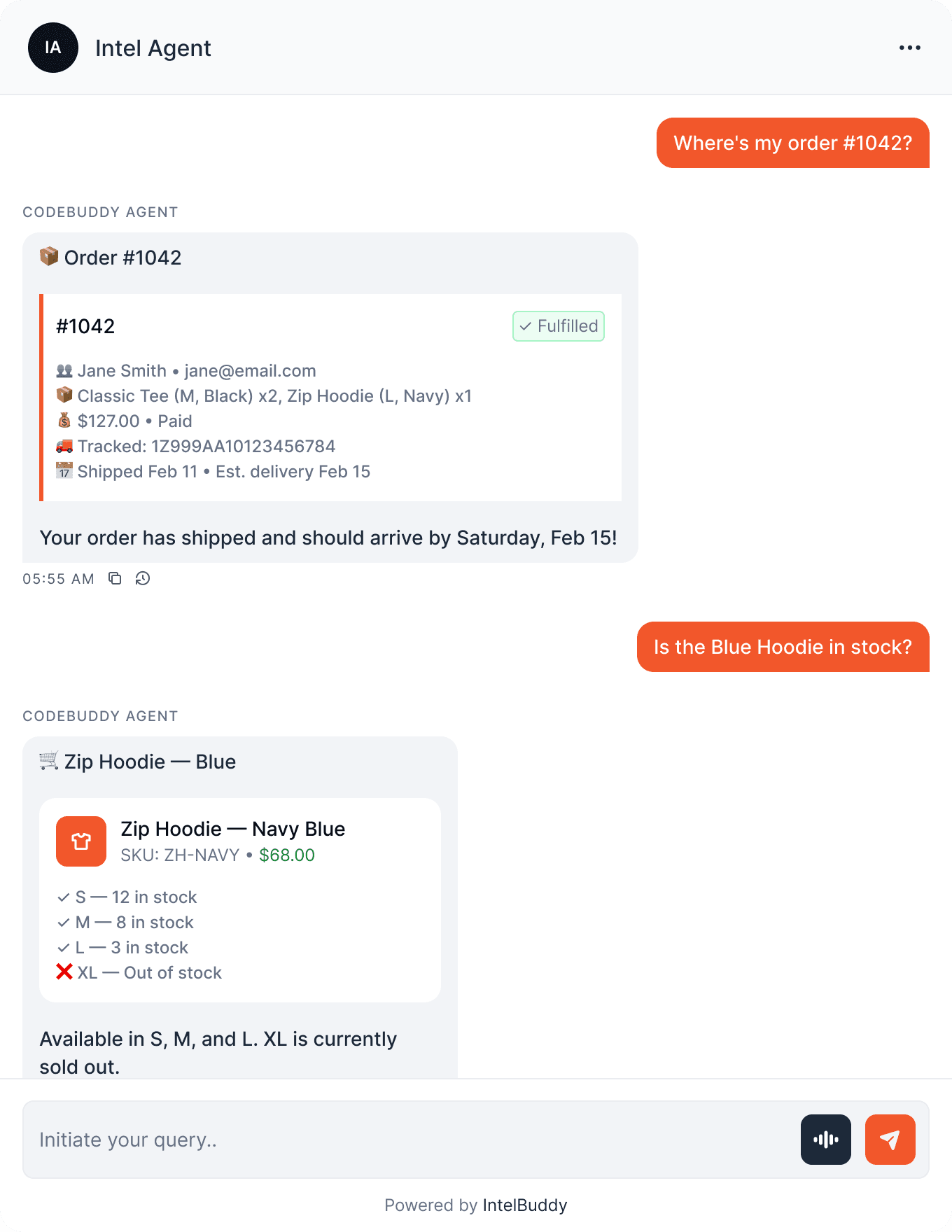
"Where's order #1042?" — instant status, tracking, and details.
Product Info
"Show details for the Classic Tee" — price, variants, stock.
Sales Analytics
"How much revenue this week?" — real-time sales data.
Inventory Check
"Is the Blue Hoodie in stock?" — quantity across variants.
Customer Lookup
"Show orders for jane@email.com" — customer history.
Refund Status
"Was order #1038 refunded?" — payment and refund details.
Before You Start
Prerequisites
Step-by-Step
Setup Instructions
Connect Shopify to IntelBuddy using a custom app and Admin API access token.

Enable Custom App Development
Allow custom apps in your Shopify admin if not already enabled.
Go to your Shopify Admin
Navigate to Settings → Apps and sales channels
Click "Develop apps"
If prompted, click "Allow custom app development"
⚙️
Settings
📱
Apps and sales channels
💻
Develop apps
✓
Allowed
Create a Custom App
Create a new custom app and configure the API scopes IntelBuddy needs.
Click "Create an app"
Name it (e.g. "IntelBuddy")
Click "Configure Admin API scopes"
Select the required scopes (see below)
Click "Save"
read_orders View orders
read_products View products
read_inventory View inventory
read_customers View customers
Read-only scopes: IntelBuddy only needs read_ access. It can look up data but cannot modify orders, products, or customer records in your store.
Install the App & Get the Token
Install the custom app to generate the Admin API access token.
Click "Install app"
Confirm by clicking "Install"
Under Admin API access token, click "Reveal token once"
Copy the token immediately — it won't be shown again
admin.shopify.com → Apps → IntelBuddy
🔑 Admin API Access Token
ACCESS TOKEN (shown once)
App: IntelBuddy • Scopes: read_orders, read_products, read_inventory, read_customers
Copy Token
Copy it now! Shopify only reveals the Admin API access token once. If you lose it, you'll need to uninstall and reinstall the app to generate a new one.
Find Your Store Domain
Your store domain is the .myshopify.com subdomain.
Example: If your admin URL is https://acme-apparel.myshopify.com/admin, your store domain is acme-apparel.
Paste Into IntelBuddy
Enter your access token and store domain.
Go to Settings → Integrations → External Tools
Find Shopify → click "Configure"
Paste the Admin API Access Token
Enter your Store Domain
Click "Save / Connect"
IntelBuddy → Settings → Integrations → Shopify
Configure Shopify
Access Token *
shpat_a1b2c3d4e5f6g7h8i9j0k1l2...
Store Domain *
acme-apparel
Save & Connect
Cancel
Revoke anytime at myaccount.google.com/permissions. IntelBuddy only touches sheets you mention.
Verify the Connection
The Google Sheets card should show "Connected".
Shopify
🟢
Connected
🎉
You're All Set!
IntelBuddy can now look up orders, products, inventory, and customer data from your Shopify store.

Try It Out
Example Conversations
Here's what your chatbot can do now that Shopify is connected.
Quick Reference
Things You Can Say
Orders
"Where's order #…?"
"Recent orders today"
"Any unfulfilled orders?"
Products
"Show details for …"
"Is … in stock?"
"Best selling products?"
Customers
"Orders for …@email.com"
"Customer history for …"
"Top customers this month"
Analytics
"Revenue this week?"
"How many orders today?"
"Average order value?"
Need Help?
Troubleshooting
"Unauthorized" or 401 error
Your access token may be invalid or revoked. Go to Shopify Admin → Apps → Develop apps, uninstall and reinstall the custom app to generate a new token.
"Not Found" or store domain error
Enter only the subdomain, not the full URL. Use acme-apparel, not acme-apparel.myshopify.com or https://acme-apparel.myshopify.com.
Missing data (e.g. can't see orders)
Make sure the correct API scopes are enabled. If you didn't select read_orders during setup, IntelBuddy won't have access to order data. Reconfigure scopes and reinstall.
"Custom app development not allowed"
Only the store owner can enable custom app development. Ask the store owner to go to Settings → Apps → Develop apps and click "Allow custom app development".
API rate limits
Shopify limits API calls to 2 requests/second (or 40/min on Basic). Very frequent queries may hit limits. IntelBuddy handles retries automatically, but responses may be slightly delayed.
Staff account permissions
Staff accounts need "Develop apps" permission to create custom apps. The store owner can grant this under Settings → Users and permissions → the staff account.

Ready to transform your supports and insights? Join growing companies using Intelbuddy to automate support and make faster decisions.
Start for free. No credit card required. Cancel anytime.
© 2026 IntelBuddy. All rights reserved.